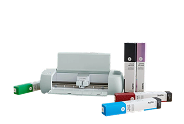
Bring your creative ideas to life with the Cricut Explore 3, a versatile smart cutting machine designed for crafting, personalisation, and DIY projects. Whether you are a beginner exploring creative hobbies or a small business owner producing customised products, this machine helps you turn digital designs into precise cuts and personalised creations.
The Cricut Explore 3 can cut, write, draw, and score a wide variety of materials, including vinyl, iron-on materials, cardstock, glitter paper, and bonded fabric. With compatibility for over 100 materials, it offers flexibility for projects ranging from custom stickers and labels to personalised apparel, greeting cards, decorative lettering, and event decorations.
- Works with 100+ materials, including popular materials like vinyl, iron-on & cardstock
- Cuts intricate designs with precision
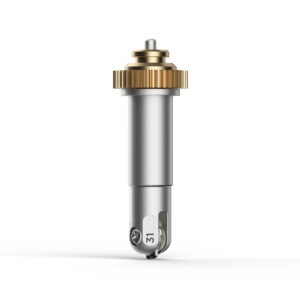
- Writes, draws, foils, scores, and more
- Compatible with your home inkjet printer to print then cut full-color designs
- Free, easy-to-learn Design Space app
- Bluetooth® wireless technology
- Upload & cut your own designs or choose from the Cricut Design Space library
- Online courses & beginner cheatsheets
- World-class customer support is available via phone or chat
- Cricut Manufacturer Warranty
Specifications
- Dimensions: 22.2 in x 7 in x 5.9 in (56.4 cm x 17.8 cm x 15 cm)
- Weight: 11.1 lbs (5.03 kgs)
- Max cut size using machine mat: 11.5 in x 23.5 in (29.2 cm x 59.6 cm)
- Max cut size using Smart Materials™: 11.7 in x 12 ft (29.7 cm x 3.6 m)
- Cut speed: up to 14.1 ips